MAIN PAGE


Some things are better when you go deeper… And virtual reality proves it. The moment you put on a VR headset, distance disappears. That’s why people are obsessed with discovering how to play VR porn games. It’s not just about control, it’s about presence. The immersive experience goes beyond sight, it touches something real, something human.
And with new projects like Braindance perfecting lifelike depth and freedom of movement, one truth stands out: the future of pleasure doesn’t just play out in front of you. It happens all around you.
Main Takeaways
- Where to find trusted sources for free and paid titles
- The best setup and optimization tips for smooth performance
- Trusted sites that lead the future of immersive adult VR
- How to stay safe and keep your privacy while playing
Table of Content
What Are VR Porn Games and Why Everyone Wants to Play Them
Before learning how to play VR porn games, know the basics.
VR porn games are virtual reality sex games where you step inside the scene. A VR headset replaces screens, creating a 360° immersive environment. Most adult VR content centres on realism. You move, choose the view, and react through controllers. Some titles try full interactivity, though the tech still evolves.

That’s why people keep searching how to get VR porn games or how to play porn games in VR. The experience isn’t about watching, it’s about being there.
VR Headsets and System Requirements for Playing VR Porn Games
Playing VR porn games starts with the right gear. A stable VR-ready PC and a quality VR headset make the difference between lag and immersion.
Every platform has its own hardware and system needs. Braindance, for instance, runs natively on Meta Quest 3/3s and Pico 4 Ultra, while other headsets like Valve Index or HTC Vive can operate in PCVR mode.
Minimum system requirements for smooth Braindance performance:
- CPU: Intel Core i3-9100, AMD Ryzen 3 3200
- GPU: NVIDIA GTX 2060, AMD RX 5600 (with the latest drivers)
- Storage: NVMe SSD (PCIe 3.0 x4 or 4.0)
Use a USB-C cable or strong wireless connection, keep VR controllers in range, and you’re ready to step in.
What Kinds of VR Porn Games Exist and How to Play Them All
When it comes to how to play VR porn games, there are several formats: WebXR games, PCVR games, standalone titles. Each uses its own tech and gives a different level of realism. Both free and paid versions exist. Free titles tease the concept; paid ones push realism.

How to Play VR Porn Games Instantly: The Allure of WebXR (Browser) Games
No downloads. No waiting. Just play. WebXR games stream through your browser. Slip on your VR headset, open the browser inside it, and enter your favorite site. Choose a title, launch the game, and the scene begins to unfold right in front of you.
Sure, visuals won’t match full PCVR quality, but for instant access and quick release, browser games do exactly what they promise.
How to Play PCVR Games for Maximum Quality
If you want the most realistic visuals and full motion control, play PCVR games. They run on a VR-ready PC with sharper detail and smoother motion than standalone headsets.
Setup:
- Check PC system requirements.
- Install SteamVR or your headset software.
- Download and install the game from a trusted source.
- Connect the VR headset by cable or Air Link.
- Launch in VR mode and adjust resolution and comfort.
That’s how you get your VR porn games running without compromises. Ready to see these settings in action? Discover the most realistic and interactive PCVR porn games in our guide.
Unlocking Desire: How to Play VR Porn Games on Meta Quest 2 and 3
Playing VR porn games on Meta Quest 2 and 3 starts with a quick sideloading setup. Enable Developer Mode, connect the headset to your PC, and install SideQuest—it loads apps outside the Meta Store.
Then download the .apk, drag it into SideQuest, and install. The game appears in Unknown Sources. Launch, tune visuals, and play.
For a complete walkthrough, check our guide on how to play VR porn games on Meta Quest 3 and Oculus Quest 2.
Comparing Ways to Play: Speed, Quality, and Freedom
Each way of playing VR porn games has its perks. Some give you instant access, others reward patience with perfect detail.
Here’s a quick look at how they stack up:
| Type | How It Works | Pros | Cons |
| WebXR (Browser) Games | Stream directly in your browser | Instant access, easy to try, works on most headsets | Lower graphics quality, limited interactivity |
| PCVR Games | Run on a VR-ready PC with headset connected via cable or Air Link | Best graphics and motion tracking, full immersion | Needs a powerful PC, setup takes longer |
| Meta Quest Games (Standalone Mode) | Install through SideQuest using Developer Mode and sideloading | Wireless freedom, solid visuals, no PC required | Setup takes extra steps, limited storage and performance |
Trusted Sites to Get VR Porn Games
Knowing how to play VR porn games is one thing, finding good ones is another. You can download VR porn games from a mix of trusted sources and third-party platforms, but not every site deserves your headset’s attention.
Below are the most reliable places to explore adult VR content safely.
Braindance: Where Technology Meets Desire

If you’re searching where to get VR porn games that actually feel alive, start with Braindance.
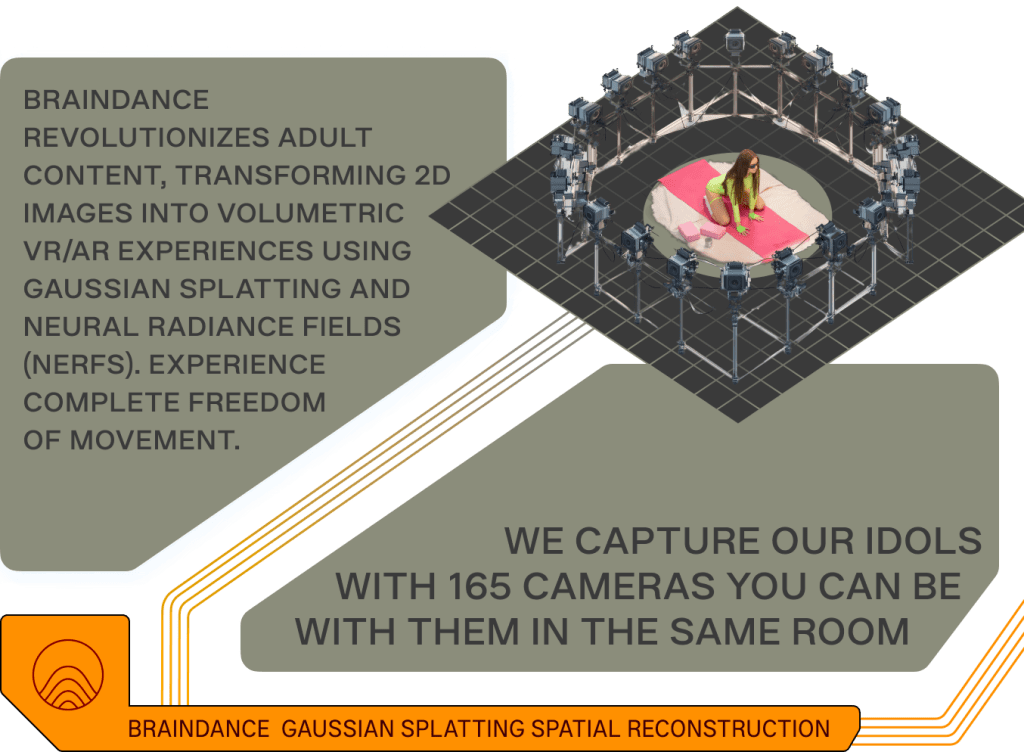
Unlike typical 180° videos, it lets you walk freely around real models captured with up to 165 synchronized cameras. Every glance and every move are rendered in 8K volumetric detail. The result? A fully immersive environment
The app runs natively on Meta Quest 3/3s and Pico 4 Ultra, with full PCVR support for headsets like Valve Index and HTC Vive. To run Braindance on PC, you need Windows 10 or 11 and an OpenXR-compatible setup. Use a graphics card like NVIDIA RTX 2060, AMD RX 5600, or better. Older models such as GTX 1080 won’t work.
Download the official Braindance app to explore the future of virtual pleasure.
VRPorn.com: The Largest Hub to Explore VR Porn Games

VRPorn.com is the biggest VR porn aggregator, hosting thousands of titles from studios worldwide.
You can’t download games directly, but you can find and stream them with ease. The site features both WebXR browser games (no download needed) and PCVR experiences in up to 8K resolution.
Each game links to its official source, making VRPorn.com one of the most trusted places to explore VR porn games safely.
Affect3D.com: Where 3D Erotica Turns Into Playable Fantasy

Affect3D.com is the home of a pioneering 3D animation studio. What started as a small blog for sharing 3DX projects evolved into a full-fledged platform for 3D adult games, animations, and art. Its best-known titles, Girlfriends 4 Ever and Bloodlust: Cerene, have become cult classics in the 3D adult gaming scene.
Steam (Adult Only): The Biggest Legit Platform for VR Porn Games

Steam might not be an adult platform, but it’s home to some of the most polished VR porn games available today. With full PCVR support, flexible adult-content settings, and wide VR-headset compatibility, Steam has quietly become a trusted space for immersive 18+ games.
Players can browse, buy, and download adult VR content directly through the Steam Store. our detailed guide on Steam VR porn games
Nutaku: The Indie Playground for 18+ Games

Nutaku calls itself “the world’s largest English gaming platform for 18+ titles,” and it lives up to the name. Founded in 2015, it hosts hundreds of titles: from free browser games to premium downloads. Nutaku partners with global indie creators, featuring inclusive games made for every fantasy.
itch.io: The Wild Side of Indie Adult Games

itch.io is an open marketplace for independent creators. Among its thousands of indie titles you’ll also find a growing number of adult VR games, from short visual fantasies to full-scale 3D experiences.
Every developer controls their own work: price, updates, and distribution. That means you can download sex VR games directly from the creators.
Now take a moment to prepare your system before playing. Calibrate your headset and check your settings. Proper optimization makes every scene smoother and more immersive.
How to Play VR Porn Games to the Fullest: Setup and Optimization Tips
Whether you use a VR-ready PC with a PCVR headset like HTC Vive or Valve Index, or play on a standalone device like Meta Quest or Pico, small tweaks can make a big difference.
Keep your system clean and fast: update your GPU drivers, close background apps, and set your PC to high performance. Сonnect your headset with a USB-C cable or stable 5 GHz Wi-Fi, then calibrate your headset for perfect tracking.
Next, open your VR software and adjust graphics settings. Lower motion blur and heavy effects to keep FPS high. Keep firmware updated and use balanced presets instead of max settings.

Troubleshooting: Common Issues and Quick Fixes
Here’s how to fix the most common problems when playing VR porn games:
- Game won’t launch or file won’t open: check system requirements, reinstall the game, and make sure antivirus isn’t blocking it.
- Low FPS or lag: update GPU drivers, close background apps, and lower graphics settings.
- Connection issues: reconnect your headset and VR controllers or restart your PC.
- Tracking problems: recalibrate sensors and clear your playspace.
- Motion sickness: take short breaks, reduce camera motion, and keep your room well-lit.
These quick troubleshooting steps fix most issues before they ruin the mood.
Extra Tips for Performance Optimization
- Use wired connections whenever possible for lower latency.
- Avoid USB hubs; plug your headset directly into your PC.
- Monitor heat—both yours and your hardware’s.
- Don’t forget regular reboots and firmware checks.
Once everything runs smoothly, you’ll feel it: responsive movement, steady frame rate, and full immersion without a single break. That’s how to play VR porn games at their absolute best.
Stay Safe and Have Fun
If you’re new to VR porn games, start simple. Try free titles first to learn how your headset and controls work. Once you’re comfortable, explore premium options for higher quality and realism.
Keep your privacy in mind: use a VPN, create a separate account, and always download from trusted sources. Make sure your playspace is clear and your headset fits comfortably.Enjoy the experience responsibly. VR adult entertainment should feel immersive, safe, and entirely your own.